The Headless CRM Era: How Microsoft Copilot Agents Are Replacing Traditional Business Apps
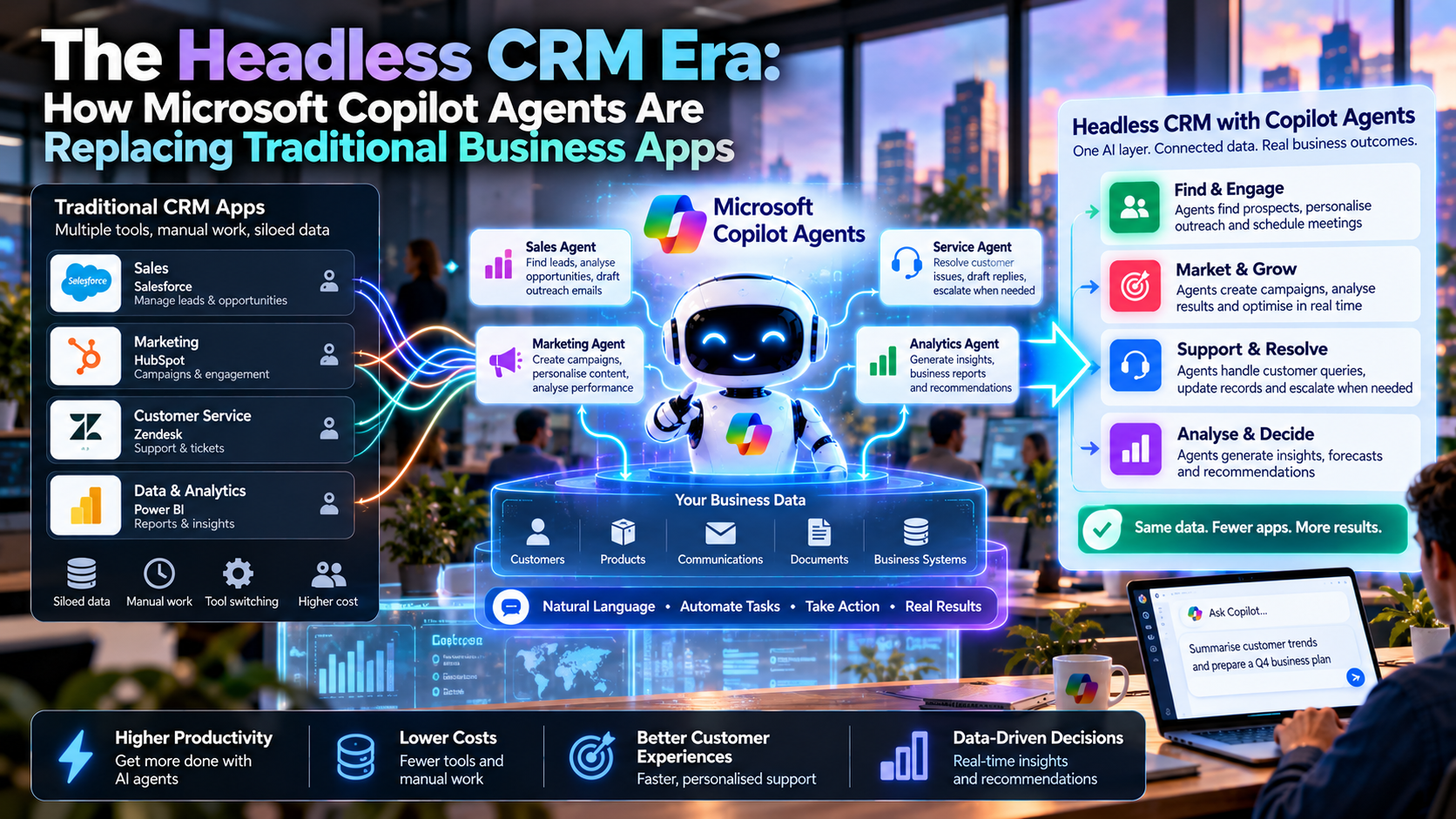
A salesperson may soon ask an agent to rescue a deal without opening a CRM dashboard. Microsoft’s new Dynamics 365 skills move customer work into Copilot, but the database, permissions and approval decisions still matter more than the chat box.
Quick Take
- What launched: Microsoft says 30 Dynamics 365 CRM skills are generally available in Copilot Cowork, supported by more than 180 generally available tools across Sales, Customer Service and Customer Insights.
- What changes: Sellers and service teams can ask for a customer outcome in Copilot instead of opening several screens and copying information between apps.
- What stays: Dynamics 365 remains the system of action for customer data and business processes. Cowork asks for confirmation before consequential updates.
- What to test: Record accuracy, permission boundaries, approval checkpoints, total usage cost and whether the agent actually saves the authorized change.
What Does “Headless CRM” Mean?
In software, “headless” usually describes a service whose core functions can be reached through a separate interface. Applied to CRM, it means a seller can request “show me the deals that need attention” or “prepare an account brief” in a work assistant. The assistant connects to CRM tools and presents the relevant result without making the user navigate every CRM screen.
That is an interface shift, not a claim that the CRM application has vanished. In Microsoft’s October 8 Dynamics 365 announcement, Microsoft calls Dynamics 365 the system of action for customer data and processes. Headless CRM is our shorthand for moving some routine work into agent-driven interfaces while preserving the records, workflow rules and governance behind them.
Why Microsoft Copilot Agents Are Changing CRM Work
Customer work already spans meetings, email, collaboration, sales opportunities and support cases. A traditional CRM workflow often asks a person to collect clues from those places and type a summary back into an application. Microsoft’s agentic CRM approach gives Copilot task-specific skills and CRM tools so it can help assemble evidence and suggest the next step where the person is already working.
A tool retrieves CRM context or performs an authorized business action; a skill guides how to use evidence for a particular task. Microsoft gives examples such as pipeline prioritization, stalled-deal analysis, case triage, verified-answer research and draft customer replies. That distinction matters: reading an opportunity and reasoning about why it stalled are different jobs, and neither automatically means an update was saved.
| Work step | App-first CRM workflow | Copilot-assisted workflow |
|---|---|---|
| Starting point | Open a CRM view and find a record. | Ask for a customer or business outcome in Copilot. |
| Gather context | Switch between CRM, messages and meeting notes. | Use connected, permitted CRM and Microsoft 365 context. |
| Propose next step | Write an analysis or draft manually. | Review the agent’s evidence and proposed action. |
| Commit action | Edit a record or send a message directly. | Approve an eligible action; verify its recorded result. |
| System of record | Dynamics 365 and related business systems. | Dynamics 365 and related business systems. |
“Replacing traditional business apps” therefore describes where some tasks begin. It does not mean every screen, specialist workflow or underlying platform is replaced.
How the Dynamics 365 Agent Stack Works
At the bottom, Dynamics 365 Sales, Customer Service and Customer Insights supply customer data and business logic. In the middle, Model Context Protocol (MCP) tools expose approved context and actions to supported AI experiences. Task skills guide the agent on which evidence to inspect and what useful output to prepare. At the top, Cowork, Code or Autopilot presents the workflow to a person.
Microsoft’s MCP connection documentation describes the connection and authorization path for Customer Service tools. A standardized tool connection makes a capability available to an agent; it does not give an employee access to customer data beyond their assigned permissions. Microsoft says its plugins respect applicable Dynamics 365 and Microsoft 365 permissions, subject to administrator setup, account access and policy.
For immediate work such as investigating an at-risk opportunity or preparing a customer reply. Cowork plans a multi-step task and asks for confirmation before consequential actions.
For teams building reusable solutions around customer decisions. Access through Microsoft’s Frontier program is a different availability state from Cowork skills.
For delegated recurring work such as reviewing changes or surfacing documented case patterns. Do not plan a general rollout on preview-only features.
Holds the customer records, business rules and authorized process changes that the agent needs to ground its answers.
A Realistic Example: Rescuing a Stalled Account
Imagine an account manager asks: “Why has the fleet-renewal opportunity slowed, and what should I do this week?” This is an illustrative workflow, not a report of a deployed customer or a promise that every tenant is configured the same way.
- Find: use permitted Dynamics opportunity details and relevant Microsoft 365 meetings or correspondence to locate gaps, blockers and recent commitments.
- Assess: distinguish recorded facts from guesses; flag a missing procurement sign-off or unverified pricing assumption.
- Prepare: draft a short account brief, a proposed follow-up task and a customer email for the manager to edit.
- Approve: let the manager confirm which CRM fields, tasks or messages may actually change.
- Verify: check the saved record and delivery result. If an action fails, tell the user it failed rather than treating a draft as completion.
Microsoft lists “Deal rescue” and “Pipeline prioritizer” among its sales skills, and Microsoft’s sales skills documentation says Cowork plans steps across data sources and asks for confirmation before sending emails, creating tasks or updating records. The useful outcome is faster preparation and clearer decisions, subject to the quality and availability of the underlying evidence.
Sales, Service and Marketing: Where the Value Could Land
Spot weak engagement, prepare meeting briefs, reconcile opportunity details and draft a 30-day plan. A forecast recommendation still needs a human check against real pipeline evidence.
Build a case summary, research answers against approved knowledge and prepare a reply. A suggested escalation must point to the relevant case and confirm who owns it.
Use permitted customer context to prepare more relevant content while enforcing consent, suppression rules and the organization’s messaging policy.
Turn repeated review work into a structured brief, then inspect exceptions in the full application when a record is disputed or the policy needs interpretation.
The Customer Service skills guide describes checkpoints for review before Customer Service field updates are committed. Neither installing a plugin nor seeing an agent response automatically grants access to the underlying CRM environment.
Will Agents Actually Replace CRM Apps?
Agents can replace some navigation and repetitive preparation. A seller who needs a meeting brief may care about the answer, citations to records and a next step, not the layout of three separate dashboards. A support representative can get a coherent case handoff without manually assembling an entire timeline.
Full CRM interfaces remain useful for administrators configuring fields and permissions, teams resolving duplicate accounts, analysts inspecting unusual data, and reviewers handling disputed or high-impact decisions. A natural-language interface can hide complexity; the application still needs ways to expose provenance, correct mistakes and audit who changed what. If the agent cannot show its evidence or a reliable action receipt, moving a task into chat may make the process harder to trust.
The Costs and Failure Modes That a Demo Can Hide
| Risk | Practical check |
|---|---|
| Wrong customer or stale context | Show record IDs, dates and sources before proposing a change. |
| False completion claim | Separate a suggestion, a draft, an approved request and a saved CRM update. |
| Broad access to sensitive accounts | Test with the user’s actual permissions and the intended environment. |
| Accidental outreach | Require review and approved recipient, message and consent checks. |
| Unexpected spending | Measure cost per completed task, including Cowork usage and relevant licenses. |
According to Microsoft’s sales skills documentation, access requires an appropriate Copilot license and, for the Dynamics 365 Sales plugin, a Sales Enterprise or Sales Premium license. Microsoft also describes Cowork usage charges that vary by task and token consumption. Confirm pricing and entitlement for your tenant rather than assuming that 30 skills are a free add-on.
EU AI Act and GDPR: Building a Governed Agentic CRM
CRM agents can process names, correspondence, purchasing history and other personal data. The European Commission GDPR guidance calls for lawful and specified purposes, data minimization, accuracy, limited retention, security and accountability. Restrict connectors and records to what a specific task requires, define retention for prompts and outputs, and document who can approve customer-facing actions. Check outbound marketing rules and consent separately where relevant.
Under the European Commission’s AI Act transparency guidance, transparency obligations can apply when people interact directly with an AI system, depending on the context and exceptions. If an agent contacts a customer directly, assess whether disclosure is required and how it should appear. Classification under the EU AI Act depends on the use case, not simply on the word “CRM”: an ordinary meeting brief and a system used to make a decision about employment or credit raise different issues. Escalate regulated decisions to the appropriate legal, risk and domain reviewers.
Keep a reviewable history of the source records, the agent’s proposal, human approval and the actual system response. These controls address a basic credibility problem: a fluent summary should never outrank the customer record it is meant to describe.
How to Pilot Headless CRM Without Losing Control
Start with one measurable task such as preparing case handoffs or identifying at-risk opportunities. Connect the correct Dynamics 365 environment and confirm the available skills, licensing and role permissions. Build a small evaluation set with clean records, incomplete records, duplicate names and deliberate exceptions. Have staff compare the agent’s claim with the source record and the resulting transaction.
Track preparation time, factual errors, approval rates, wrong-record attempts, saved-action success, manual corrections and total cost per completed task. Let users open the full CRM record when evidence is thin. Widen access only after the workflow can show what it read, what it recommended and what changed. This is a practical adoption test, not a published Microsoft performance benchmark.
MaGeN-AI View
The Takeaway
The strongest case for headless CRM is fewer routine app steps while the governed customer record stays intact. Microsoft’s new skills make that direction tangible, but their value will be proved by accurate actions, visible approvals and reliable evidence. The CRM screen may become optional for some tasks; trust in the underlying CRM cannot.
Frequently Asked Questions
What is headless CRM?
It is an approach where CRM data and approved actions are available through another interface, such as an AI agent, so some tasks do not require navigating the full CRM application.
Are Microsoft’s 30 CRM skills generally available?
Microsoft says the 30 prebuilt CRM skills are generally available for Copilot Cowork as of October 8, 2026. Code has Frontier access, while Autopilot remains in private preview.
Does Copilot Cowork update Dynamics 365 without approval?
Microsoft says Cowork asks users to confirm consequential actions, including record updates, emails and tasks. Check your organization’s permissions and workflow configuration.
Does using Copilot mean a company can remove Dynamics 365?
No. Microsoft describes Dynamics 365 as the system of action for customer data and business processes even when the task starts in Copilot.
What should an organization measure in a CRM agent pilot?
Measure record accuracy, permissions, approval behavior, saved-action success, user corrections and total cost per successfully completed task.