Google Gemini Agent Explained: Is Workspace Becoming an AI Operating System?
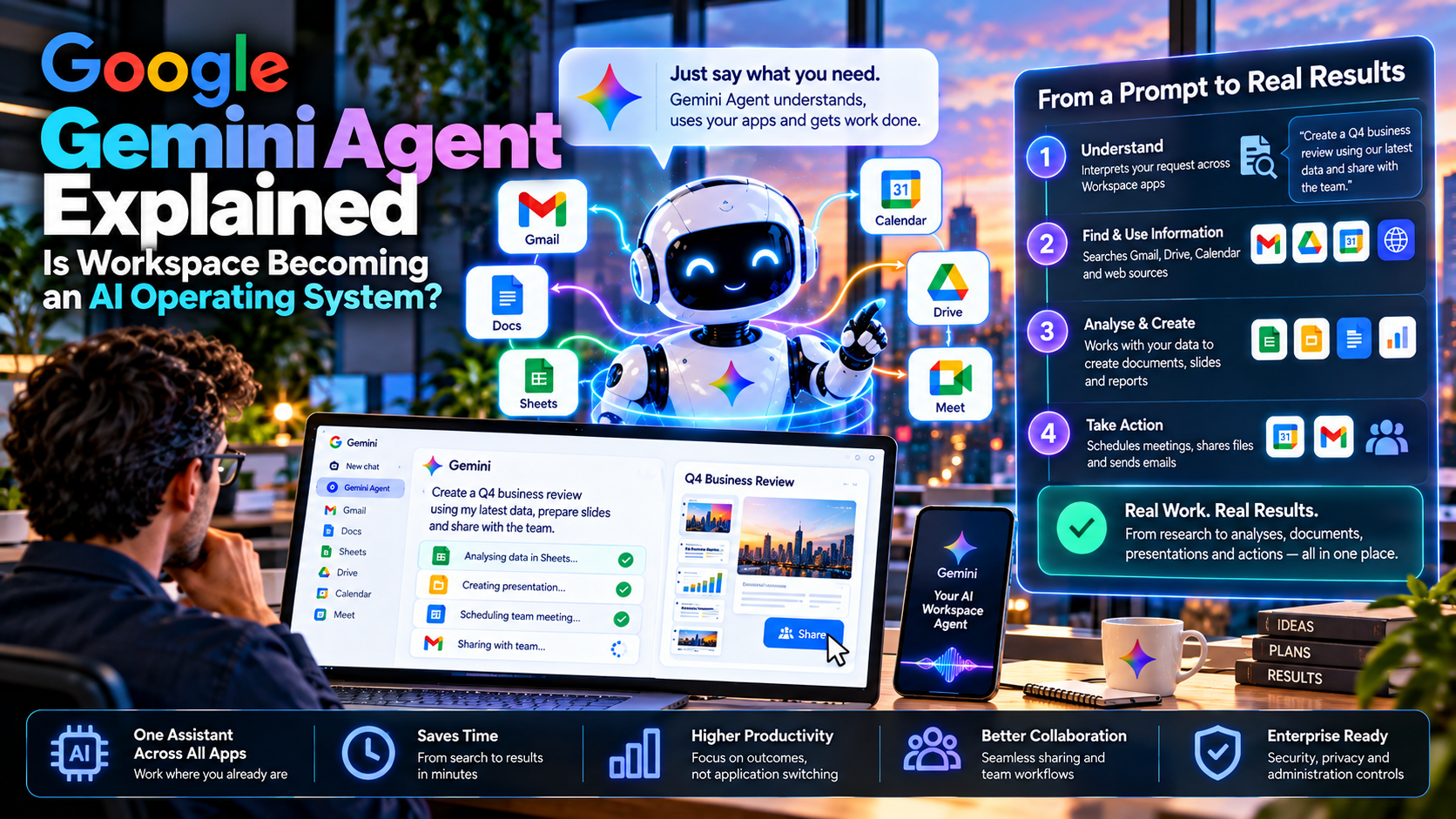
Google wants Gemini to move from answering questions inside an app to coordinating work across an organization. The change could make Workspace a new starting point for daily tasks, but an agent still needs permissions, verification and a human owner.
Quick Take
- What was announced: on October 8, Google described one enterprise Gemini agent for questions, research, creation, coding and delegated tasks across work surfaces.
- Why Workspace matters: Google says the agent can work inline in Gmail, Drive, Docs, Slides, Sheets, Chat and Calendar with shared context and controls.
- The bigger shift: an assistant can plan a task, use tools and skills, and return work inside familiar apps instead of only producing a chat answer.
- What remains to prove: access, accuracy, edition-specific features, data handling, costs and auditability all determine whether the system is useful in production.
What Is the New Google Gemini Agent?
Google’s October 8 announcement presents Gemini as a single enterprise agent that can answer questions, handle knowledge work, create media and write or run code. The key change is the unit of work: a person can describe an objective, and the agent can plan steps, use approved skills and tools, then bring the result back to the inbox, document or development environment where the work belongs. These are Google’s announced capabilities, not an independent assessment of performance.
This is distinct from the earlier consumer feature also called Gemini Agent in the Gemini app. Here the focus is enterprise context, Workspace integration, organization-level controls and tasks that may continue after a laptop is closed. Google also describes access through other channels, including desktop, mobile, Microsoft 365 and Slack. Its cross-platform ambition is larger than adding one more writing button to Docs.
How Does Gemini Work Inside Google Workspace?
Google names Gmail, Drive, Docs, Slides, Sheets, Chat and Calendar as places where the agent works inline. In the company’s examples, an employee asks it to coordinate a meeting from relevant team context, or to research a topic, assemble a model in Sheets and prepare a slide deck. Google also describes proactive suggestions, such as offering to take on a project-update request that arrived by email.
These scenarios rely on the agent knowing which people, documents and conversations are relevant. Google calls that context and memory: it distinguishes the current task from organizational knowledge, reusable procedures and past actions. More continuity may reduce repeated briefing, but it also makes retention, access review and correction critical. A stale customer record or an over-shared document can mislead an agent just as it can mislead a person.
From Connected Apps to a Work Orchestration Layer
| Layer | What Google describes | What to verify |
|---|---|---|
| Workspace surfaces | Tasks can begin and return inside email, documents, spreadsheets, chat and calendar. | Which surfaces and actions are enabled for your edition and region? |
| Tools and skills | Connectors fetch information or perform actions; reusable skills encode repeatable workflows. | Which connectors can write, send or share information? |
| Context and memory | A cloud-based agent maintains task state and organizational context across sessions. | What is retained, for how long, and who can inspect or delete it? |
| Agent identities | A coworker agent can have its own account, mailbox, Drive and presence in Chat. | Can admins trace every action to an agent and a responsible human? |
| Model routing | Google describes selecting from Gemini and Anthropic Claude models for different tasks. | Which model processes which data under the applicable terms? |
Earlier Gemini Connected Apps coverage focused on invoking other services from an assistant. The October enterprise announcement adds a more ambitious layer: persistent tasks, governed identities, memories and workflows spanning those services. That distinction matters when evaluating both productivity gains and the consequences of a misconfigured connector.
Is Workspace Becoming an AI Operating System?
As an analogy, yes—if “operating system” means the interface where people assign, route and monitor work. An agent with identity, memory, tool access, task scheduling and policy enforcement begins to resemble a control layer above individual applications. A worker might ask for an outcome rather than open five tabs and manually transfer information between them.
It is still an analogy. Docs, spreadsheets, CRMs, databases and email systems remain systems of record; Windows, macOS and Android remain device operating systems. Gemini’s usefulness depends on those applications, their APIs and the organization’s permission design. Google’s announced support for other work tools also suggests that Workspace is one prominent surface for the agent, rather than the entire boundary of its operation.
The practical question for a buyer is whether the agent can complete a task accurately, with visible provenance and reversible steps. If the final document looks polished but contains a fabricated figure or was shared with the wrong person, a smooth interface has not solved the workflow.
What Would a Real Team Workflow Look Like?
Consider a small operations team preparing its weekly project update. A narrowly scoped agent could search approved Drive folders, compare figures in a designated Sheet, draft a summary in Docs and propose an email to stakeholders. A project lead would check the figures, accept or edit the draft, then approve sending. This is an illustrative workflow built from the kinds of abilities Google describes; it is not a promise that every step is currently available in every account.
Start read-only, then allow draft creation, and add sending or editing rights only after the team can verify sources and recover from mistakes. Require a visible trail: which files were read, which cells were used, which tool changed a document, what was sent, and under whose authorization. Evaluate time saved per accepted update rather than time saved per generated draft.
Coworker Agents, Model Choice and the New Failure Modes
Google says a team can create a coworker agent with its own Workspace identity and add it to a Chat space. That separation can improve accountability if permissions and logs actually follow the agent. It can also create a new management task: who owns the account, reviews its group memberships and removes its access when the project ends? Google describes role-based permissions, agent-attributed audit logs, sandboxes and a network gateway; each should be tested against the organization’s own setup.
The same caution applies to model routing. Google says Gemini can select between its own models and Anthropic Claude models today, with other options contemplated later. Model flexibility may help cost and quality, but a procurement team should ask which models see sensitive prompts, where processing occurs and how spend caps apply to long tasks. A successful demo does not answer those questions for a regulated deployment.
Edition details deserve special attention: Google’s Gemini Enterprise admin guide describes controls for enabling Gemini Enterprise and accessing Workspace data, while Google’s edition comparison notes notes that some Business edition sign-up paths have different reporting, retention or data-region features. Treat “enterprise governance” as a configuration to inspect, not a blanket property of every subscription.
EU AI Act, GDPR and Deployment Checks
European teams should define the agent’s purpose, permitted data and human approval points before connecting a company-wide inbox or shared Drive. Under the European Commission GDPR principles, personal-data use calls for a lawful basis, purpose limitation, minimization, appropriate retention and security. Review Google’s Workspace privacy documentation for the relevant Workspace product, and verify the applicable edition’s contractual terms and data location separately; Workspace and Gemini Enterprise features should not be assumed to have identical settings.
The EU AI Act assessment depends on the actual use case. An internal project recap is different from an AI system used to influence hiring or another consequential decision. The European Commission AI Act transparency guidance addresses duties to inform people when they interact directly with certain AI systems and other transparency duties. If an agent represents itself to customers or employees, assess what disclosure applies; keep a human accountable for material decisions and check sector-specific rules. This paragraph is general information, not a substitute for a deployment-specific legal review.
How to Test Google Gemini Agent Before Scaling It
Pilot with one team, approved folders and separate read and write permissions.
Check source citations, numerical accuracy, missing context and unexpected tool calls.
Measure successful tasks, human correction time, failure recovery and cost per accepted result.
Inspect identity logs, retention, data regions, external sharing and the kill switch.
Do not assume an announcement gives every customer immediate access to every described capability. Confirm availability, licensing, admin settings and geography with Google for the exact product you plan to use. The strongest pilot result is a repeatable, inspectable task that a team would actually trust with its work.
MaGeN-AI View
The Takeaway
Google’s most consequential claim is that the agent can carry context and responsibility across tools, not simply draft better prose in an app. Workspace could become the front door to many business workflows if customers can prove accuracy, permission boundaries and measurable savings. The organization still decides what an agent may see, change and send.
Frequently Asked Questions
What is Google Gemini Agent for work?
Google describes it as one enterprise agent for answering questions, planning and completing approved tasks across Workspace and connected work systems.
Is Gemini Agent the same as Gemini in Gmail or Docs?
The new enterprise agent is designed to coordinate work across tools and sessions; inline assistance in an individual Workspace app is one part of that experience.
Does Gemini replace Google Workspace apps?
No. The operating-system comparison is an analogy for coordination; email, documents, spreadsheets and other apps remain where work is stored and reviewed.
Can a Gemini coworker agent act as a team member?
Google describes coworker agents with their own account and shared-team presence. Access and actions still need administrator controls, an accountable owner and audit review.
Is the new Gemini Agent available to every Workspace customer?
Do not assume so. Availability, connected-app rights, data handling and admin controls depend on the exact product, edition, rollout and region.