Video is becoming one of the largest untapped knowledge sources inside companies. Training sessions, product demos, sales calls, factory footage, webinars, lectures, meetings, support recordings, and YouTube videos all contain useful information, but most teams still search them slowly.
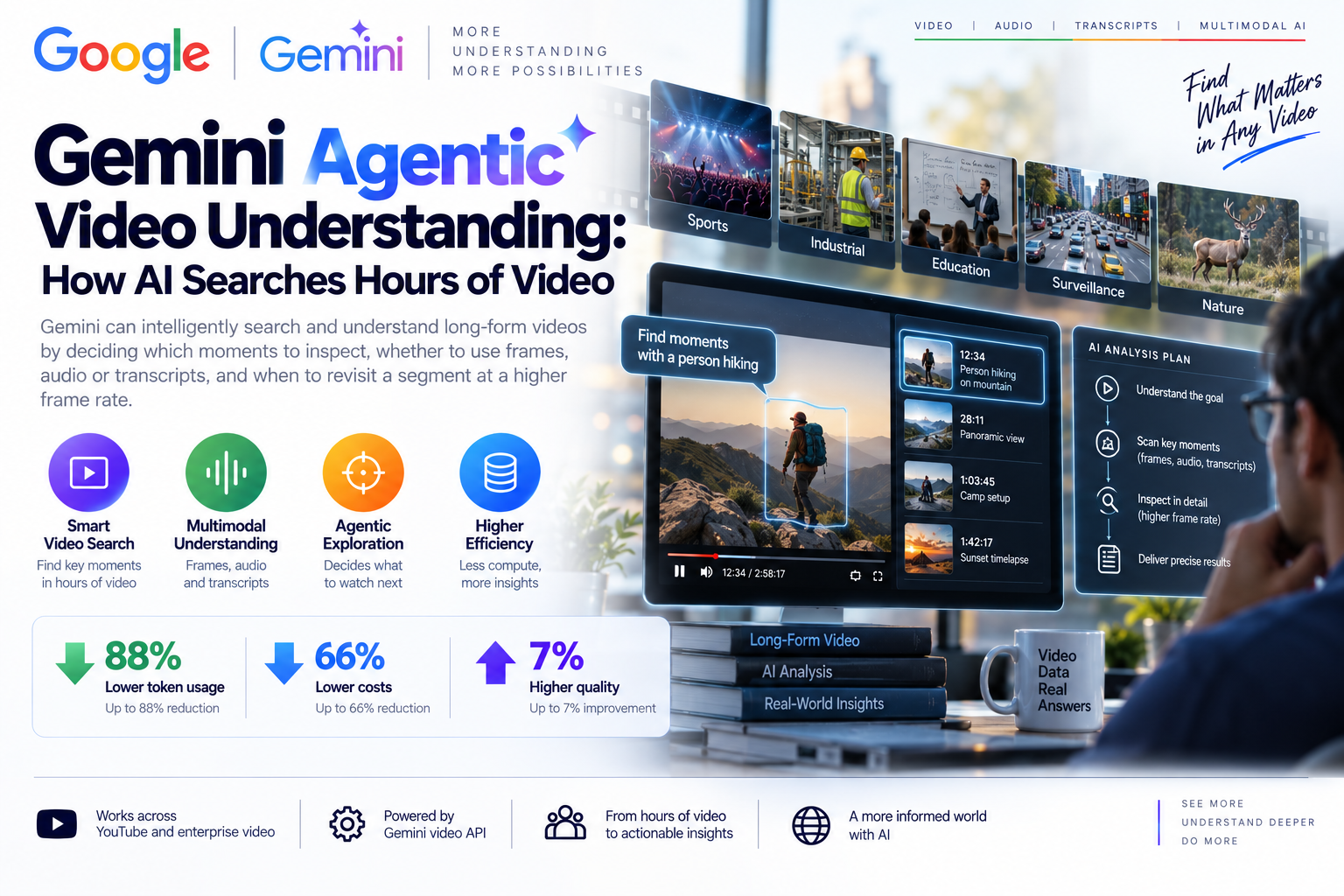
Gemini agentic video understanding changes the workflow. Instead of reading video at a fixed frame rate from start to finish, Gemini can take a goal-directed approach: inspect transcripts, scan visual frames, listen to audio, revisit important segments, and spend more attention only where the question requires it.
Quick Take
- Gemini agentic video understanding is for analyzing existing video, not generating or editing video like Gemini Omni Flash.
- Google announced the feature on September 1, 2026, initially across Gemini 3.7 Flash, 3.6 Flash, and 3.5 Flash-Lite, with current docs also listing Gemini 3.8 Flash support.
- Google reports up to 88% fewer tokens, up to 66% lower analysis cost, and up to 7% quality improvement across standard video analysis benchmarks.
- The model can dynamically choose what to inspect: visual frames, audio, transcripts, timestamps, or higher frame-rate rechecks of important moments.
- The strongest use cases are long-form search, anomaly detection, moment retrieval, training-library Q&A, video-powered agents, and YouTube-style content understanding.
The shift is simple: Gemini is no longer just watching video; it is searching video with a plan.
What Is Agentic Video Understanding?
Agentic video understanding is a processing mode where Gemini actively navigates video content based on the user's goal. If the question is broad, it may use transcripts and key visual moments. If the question depends on a specific motion, object, slide, scene change, or event, it can inspect a segment more closely.
That is different from static processing. In static mode, video is sampled at a fixed rate, commonly 1 frame per second by default, and the selected frames are placed into context. Static processing is simple and predictable, but it can be expensive for long videos and may miss fast events between sampled frames.
Agentic mode is more like an AI researcher moving through a timeline. It starts from the question, decides which signals matter, checks the relevant media, and then builds the final answer from the evidence it inspected.
What Google Announced
Google says agentic video understanding is available for video uploads and YouTube videos through the Gemini API in Google AI Studio and the Gemini Enterprise Agent Platform. It is designed for video analysis tasks where the model needs to search, inspect, compare, retrieve moments, detect anomalies, or answer questions across long-form content.
The headline efficiency numbers are strong: Google reports token reductions of up to 88%, cost reductions of up to 66%, and quality improvements of up to 7% across standard video analysis benchmarks. The company says the gains are especially useful for long-form video, including lectures, tutorials, keynotes, and multi-hour recordings.
Static Video Vs Agentic Video
The easiest way to understand the feature is to compare it with traditional video processing. Static mode turns the video into a predictable stream of sampled context. Agentic mode treats the video as a searchable environment.
| Area | Static video processing | Agentic video understanding | Best fit |
|---|---|---|---|
| Sampling | Reads frames at a fixed frame rate, often 1 FPS by default. | Dynamically chooses moments, modalities, frame rates, and resolution based on the question. | Static for short clips; agentic for long or targeted video search. |
| Cost | Token use grows quickly as video duration increases. | Loads only relevant moments and signals, reducing unnecessary context. | Agentic is stronger for hours of recordings, lectures, meetings, and archives. |
| Accuracy | Can miss fast events between frames or overload the context window. | Can revisit suspicious or important segments at higher detail. | Agentic is useful for anomaly detection, object counting, and moment retrieval. |
| Latency | Predictable for short videos and simple prompts. | May take longer for complex questions because the model performs a search loop. | Use streaming or background execution for longer tasks. |
| Developer control | Developers set FPS, clipping, and media resolution manually. | The model handles much of the search strategy internally. | Use both modes in one workflow when short and long videos are mixed. |
How It Works In Practice
Imagine asking: "In this two-hour machine inspection video, when does the vibration pattern first change?" A static system may sample the whole file evenly and still miss a quick motion. An agentic system can inspect the transcript or timestamps, scan broad visual sections, revisit suspicious windows, and sample specific segments more closely.
The same pattern applies to education, media, customer support, compliance, and product research. The model does not need to consume every second at equal resolution. It can ask, in effect: what do I need to watch to answer this question well?
| Question type | Likely media signals | Example output | Why agentic helps |
|---|---|---|---|
| Long-form Q&A | Transcript first, then visual frames for verification. | Summary, key arguments, timestamps, or source-backed answer. | It avoids loading every frame when the answer is mostly spoken. |
| Moment retrieval | Frames, cuts, objects, slides, captions, and audio cues. | "The product demo starts around 18:42." | It can search for a small target inside a long timeline. |
| Video anomaly detection | Motion windows, unusual frame changes, audio spikes, repeated review. | Flagged segments for human review. | It can resample interesting moments at higher detail. |
| Counting action or objects | Repeated visual events and segment-level rechecks. | Count of movements, people, parts, or repeated events. | It can revisit likely event windows instead of trusting one pass. |
| YouTube AI search | Video transcript, visuals, public metadata, and specific watch-page context. | Answers about the video someone is watching. | It can make video content searchable in a conversational way. |
Why It Matters For Businesses
Many organizations already have video libraries, but they are poorly indexed. A company may have hundreds of hours of training recordings, product demos, safety walkthroughs, customer interviews, sales calls, conference talks, or machine footage. Searching that material manually is slow, and traditional metadata rarely captures the useful details.
Agentic video analysis gives teams a more practical way to turn video into searchable knowledge. A product manager can ask where a feature was discussed. A quality engineer can search for abnormal movement. A learning team can build quizzes from training videos. A media team can find exact moments for editing. A support team can review screen recordings without watching every minute.
For Content Teams
Search webinars, podcasts, keynotes, and YouTube videos for exact moments, summaries, clips, captions, and theme extraction.
For Operations Teams
Review inspection footage, training videos, warehouse recordings, process walkthroughs, and incident clips with human oversight.
For Education Teams
Convert long lectures or training sessions into learning summaries, timestamped notes, FAQ pages, and assessment questions.
For Developers
Build video-powered agents that preserve context across turns and combine YouTube, uploaded files, and cloud-hosted recordings.
Developer Notes
The practical implementation detail is simple: static processing is still the default, so developers must explicitly choose agentic processing when the workload needs it. Google's Gemini API docs show the `processing: "agentic"` setting for the Interactions API and `mediaProcessing: "AGENTIC"` for GenerateContent in the Gemini Enterprise Agent Platform.
from google import genai

client = genai.Client()

interaction = client.interactions.create(
    model="gemini-3.8-flash",
    input=[
        {
            "type": "video",
            "uri": "YOUR_VIDEO_FILE_OR_YOUTUBE_URL",
            "mime_type": "video/mp4",
            "processing": "agentic"
        },
        {
            "type": "text",
            "text": "Find the three most important moments and return timestamps."
        }
    ],
)

print(interaction.output_text)
The docs also highlight important operational details. Public YouTube URLs can be used, uploaded files are recommended for large or reusable videos, and multi-turn conversations need video context preservation. In stateless mode, response steps such as `processing_call` and `processing_result` may need to be carried into the next request so follow-up questions do not lose context.
Implementation Checklist
- Choose the right mode: use static for short clips and latency-sensitive full-frame review; use agentic for long-form search and targeted queries.
- Write specific prompts: ask for timestamps, evidence, confidence, and exact segment references.
- Use files for reusable video: upload long videos once when multiple prompts or follow-up questions are expected.
- Preserve conversation context: keep the returned processing steps or use stateful interactions for multi-turn video agents.
- Design human review: anomaly detection, safety footage, employee monitoring, and compliance review should not rely on AI output alone.
- Log decisions: record prompt, model, processing mode, video source, timestamped answer, and human validation status.
- Respect content rights: avoid using private, unlicensed, or restricted videos without permission.
- Protect personal data: faces, voices, locations, screens, and workplace footage may contain personal or confidential data.
EU AI Act And Responsible AI Considerations
For ordinary content search, learning summaries, internal knowledge management, or public YouTube Q&A, agentic video understanding may often be a lower-risk AI use case. But the risk category can change quickly depending on context.
If video analysis is used for worker monitoring, biometric identification, law enforcement, education decisions, hiring, credit, insurance, healthcare, critical infrastructure, or safety decisions, teams need stronger governance. That means human oversight, risk assessment, documentation, auditability, appeal routes where relevant, and careful high-risk screening under the EU AI Act.
GDPR also matters because video can include faces, voices, location details, screens, names, health information, children, customers, or employees. Before deploying AI video analysis in Europe, organizations should define lawful basis, retention limits, access controls, data minimization, vendor terms, and whether a data protection impact assessment is needed.
Responsible AI note: Use agentic video analysis to assist search and review, not to silently make high-impact decisions about people. For safety, workplace, medical, legal, or compliance footage, keep a qualified human review step and document how video data is handled.
Best Fit Recommendation
Best fit: Gemini agentic video is strongest for long-form video understanding, YouTube AI search, training libraries, video Q&A, customer research, media clipping, timestamp retrieval, and anomaly triage where the answer depends on a small part of a long video.
Use static mode when: the video is short, the whole clip needs equal attention, latency is critical, or you need predictable frame-level sampling across the full file.
Bottom line: Agentic video understanding is the next step after multimodal AI could "watch" a video. It lets AI decide where to look, what signal to use, and when to inspect more closely. For businesses sitting on hours of unused video knowledge, that is a meaningful shift.
FAQ
What is Gemini agentic video?
Gemini agentic video is a video understanding mode where the model dynamically searches a video timeline, inspecting frames, audio, and transcripts based on the user's question.
How is it different from Gemini Omni Flash?
Gemini Omni Flash focuses on video generation and editing. Agentic video understanding focuses on analyzing, searching, and answering questions about existing videos.
How much can agentic video reduce tokens?
Google reports up to 88% fewer tokens, up to 66% lower cost, and up to 7% quality improvement across standard video analysis benchmarks.
Can Gemini search YouTube videos?
Google says agentic video understanding is available for video uploads and YouTube videos through the Gemini API, and it will also support YouTube's Ask YouTube experience on the watch page.
What are the best use cases?
Strong use cases include long-form video Q&A, moment retrieval, anomaly detection, action counting, training-library search, video-powered agents, and YouTube AI search.