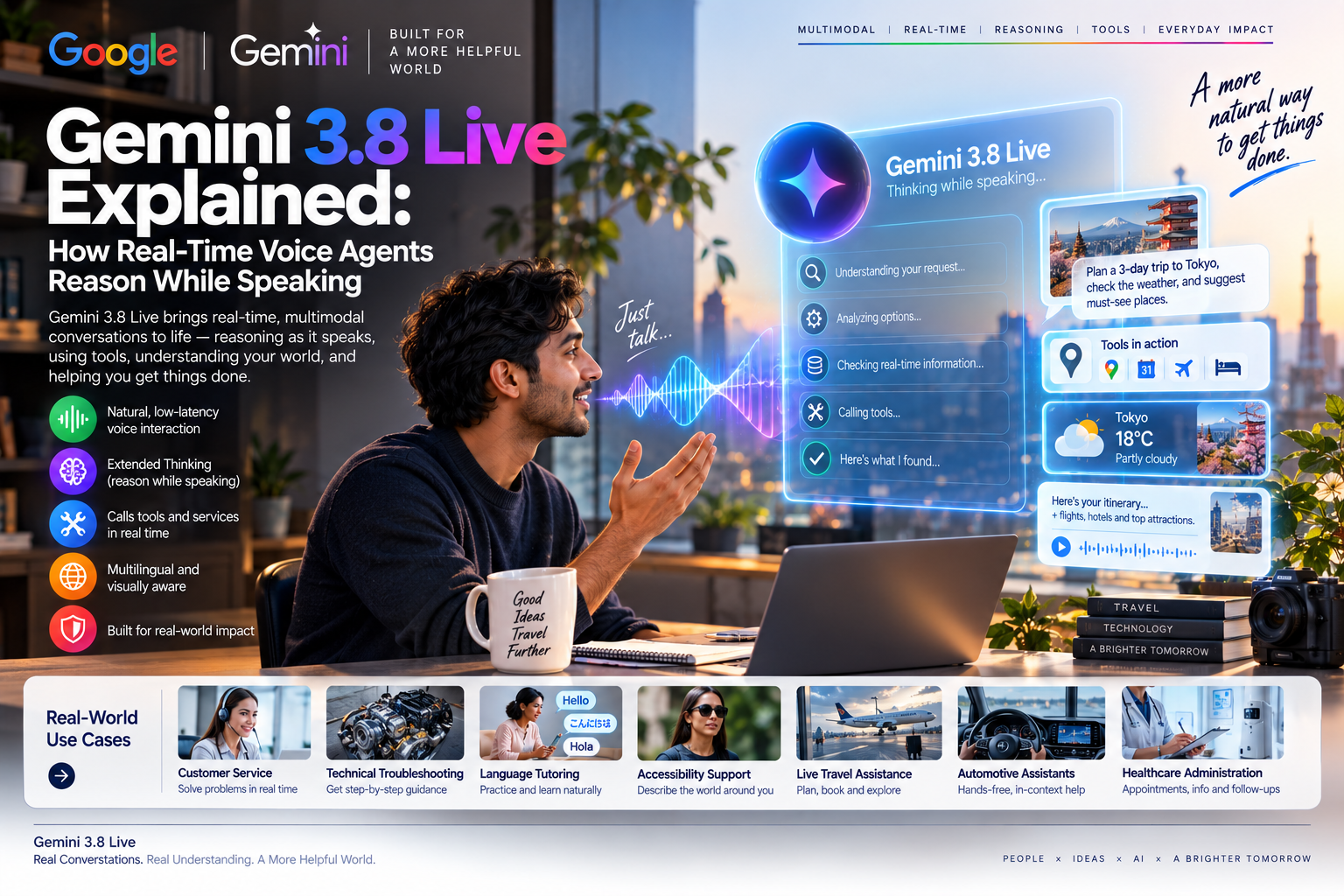
Gemini 3.8 Live moves voice AI beyond a speech interface for a chatbot. It can follow a continuous multimodal conversation, handle interruptions, use visual context, call tools in the background, and - in the Extended Thinking version - narrate useful progress while a complex task continues.
Quick Take
- Gemini 3.8 Live is Google's default low-latency option. It is designed for fluid dialogue, visual grounding, multilingual interaction, and scalable voice-agent workloads.
- Extended Thinking is for harder tasks. Developers can select low, medium, or high background reasoning while the agent keeps the conversation active.
- Tool calls no longer have to freeze the conversation. Non-blocking functions can search, book, retrieve, or update systems while the agent acknowledges the request and continues speaking.
- Progress narration is not full chain-of-thought. Spoken status updates can improve trust and usability, but they are summaries of activity, not a complete audit of internal reasoning.
- Production safety remains an application responsibility. Hallucinations, authentication, privacy, action approval, escalation, and accessibility must be engineered around the model.
What Is Gemini 3.8 Live?
Google introduced Gemini 3.8 Live and Gemini 3.8 Live Extended Thinking on 15 September 2026. Both are native-audio, multimodal models based on Gemini 3 Pro. They can receive streaming audio, text, images, and sampled video frames, then return spoken responses with optional transcripts.
The important difference is continuity. A traditional assistant converts speech to text, waits for a complete turn, generates text, and converts that text back into speech. A live model processes an ongoing stream. It can detect when a user begins or stops speaking, respond incrementally, handle interruptions, retain session context, and connect what it hears with what a camera or shared screen shows.
Five Generations Of Voice AI
| Voice architecture | How it works | User experience | Main limitation |
|---|---|---|---|
| Speech-to-text assistant | Audio is transcribed, processed as text, and converted back to speech through separate stages. | Command-and-response interaction with clear pauses. | Meaning in tone, timing, interruption, and non-verbal audio can be lost. |
| Turn-based AI voice | A language model answers richer questions, but usually waits for the user's turn to end. | More capable answers, yet conversations can still feel stop-start. | Latency grows when prompts, retrieval, or reasoning become complex. |
| Real-time multimodal agent | Audio, text, and visual context are processed as a continuous session. | Users can interrupt, point a camera, change language, or refine a request naturally. | Streaming media increases privacy, network, cost, and observability requirements. |
| Conversational tool user | The agent calls APIs for search, booking, CRM, navigation, or enterprise data. | The conversation can continue while background functions execute. | A mistaken tool call can create real-world consequences, not just a wrong answer. |
| Reasoning-progress voice agent | Background reasoning and tools continue while the model gives short status updates. | Longer tasks feel responsive because users hear what stage is underway. | Progress language can sound authoritative even when the underlying result remains uncertain. |
Gemini 3.8 Live vs. Extended Thinking
| Area | Gemini 3.8 Live | Gemini 3.8 Live Extended Thinking |
|---|---|---|
| Best fit | Most low-latency voice experiences, high-volume support, tutoring, and responsive assistants. | Complex troubleshooting, multi-step planning, research, coordination, and tool-heavy workflows. |
| Reasoning control | Supports interleaved reasoning, but developers do not set a thinking level. | Background reasoning can be configured at low, medium, or high. |
| Function calling | Supports non-blocking calls by default and a backwards-compatible blocking mode. | Uses asynchronous, non-blocking function calls only. |
| Conversation behavior | Optimized for fast, fluid responses and visual grounding. | Can acknowledge a request, narrate progress, and continue speaking while deeper work proceeds. |
| Trade-off | Better default when speed, scale, and predictable interaction matter most. | Use only where added task quality justifies more reasoning time, complexity, and cost. |
How A Non-Blocking Voice Task Works
Progress Narration Is A User Interface, Not An Audit Log
A phrase such as "I am checking available trains" can reassure the user that work is underway. It should not be treated as a complete explanation of model reasoning or proof that the final answer is correct. Reliable deployments should expose verifiable results: the source consulted, tool called, parameters used, returned status, and any human approval.
Practical Use Cases
| Use case | What the live agent can do | Essential safeguard |
|---|---|---|
| Customer service | Identify intent, retrieve account context, explain progress, update a ticket, and transfer with a useful summary. | Authenticate before account access and require confirmation for refunds, cancellations, or profile changes. |
| Technical troubleshooting | Observe a device or screen, ask diagnostic questions, search manuals, and guide a user step by step. | Separate safe checks from actions involving electricity, machinery, cybersecurity, or warranty risk. |
| Language tutoring | Switch languages, run role-play exercises, adapt pacing, and provide immediate pronunciation feedback. | Avoid turning tone analysis into prohibited or intrusive emotion scoring in educational settings. |
| Accessibility support | Describe visible objects, read text aloud, navigate an interface, or provide hands-free guidance. | State uncertainty and never present visual interpretation as a guaranteed safety signal. |
| Live travel assistance | Compare routes, translate dialogue, monitor changes, and prepare reservations while the conversation continues. | Reconfirm names, dates, locations, price, cancellation terms, and payment before booking. |
| Automotive voice assistant | Explain vehicle functions, find charging or parking, plan routes, and support hands-free troubleshooting. | Use deterministic validation and explicit confirmation for vehicle controls; never distract the driver with long reasoning narration. |
| Healthcare administration | Schedule appointments, explain preparation instructions, navigate benefits, and route messages. | Keep diagnosis, triage, medication, and emergencies under approved clinical workflows with human escalation. |
What Developers Need To Know
Google's current documentation labels the Live API as preview. The standard model ID is gemini-3.8-live; the deeper-reasoning option is gemini-3.8-live-extended-thinking. Native audio sessions use streaming connections, voice activity detection, interruption events, optional input/output transcription, session resumption, and context compression.
Visual grounding also needs realistic expectations. The API documentation describes video input as sampled image frames at up to one frame per second, not continuous high-frame-rate machine vision. Current limits list 15 minutes for an audio-only session and two minutes for audio plus video before session-management techniques are used to extend interaction.
Production Readiness Checklist
- Measure end-to-end latency. Test microphone capture, network delay, model response, tools, audio playback, and interruption recovery together.
- Use secure authentication. Keep API credentials server-side; Google recommends ephemeral tokens for direct client-to-server implementations.
- Constrain tools. Use narrow schemas, allowlists, least privilege, idempotency, spending limits, and confirmation gates.
- Track actual state. Extended Thinking can remain active after a turn-complete event, so applications should follow the documented interaction status.
- Design for failure. Provide timeouts, retries, clear uncertainty, human handoff, and recovery after canceled or interrupted function calls.
- Evaluate real conversations. Test accents, noise, code-switching, overlapping speech, silence, accessibility needs, and adversarial instructions.
- Log responsibly. Preserve tool outcomes and approvals while minimizing storage of raw audio, video, transcripts, and personal data.
Limits Behind The Demo
Google reports strong benchmark results for Extended Thinking, including an 82.6 score on Artificial Analysis' Speech-to-Speech Quality Index and 68.6% on the tau-Voice task benchmark. These measurements are useful indicators, but they do not guarantee performance in a specific language, accent, contact centre, vehicle cabin, clinical workflow, or tool environment.
Google's model card also lists familiar foundation-model risks: hallucinations, jailbreak attempts, occasional slowness, and timeouts. Its stated knowledge cutoff is January 2025, so current facts should come from connected, approved sources. Google says generated audio carries SynthID watermarking, but deployers still need visible or audible disclosure rather than relying on watermarking alone.
EU AI Act, GDPR, And Responsible Voice AI
Most ordinary customer-support or productivity voice assistants are not automatically high-risk under the EU AI Act. Classification depends on intended purpose. Risk can rise sharply when a voice agent influences healthcare, employment, education, credit, insurance, public services, law enforcement, or safety-critical vehicle functions.
Article 50 transparency obligations apply to systems that interact directly with people. In practice, a caller should be told clearly that they are speaking with AI, even when the voice sounds natural. Synthetic-audio marking such as SynthID can support traceability, but it does not replace an understandable disclosure at the beginning of the interaction.
- Provide disclosure and choice. Identify the AI, explain the task, and offer a practical route to a person.
- Protect voice data. Establish a GDPR lawful basis, minimize recordings and transcripts, define retention, secure transfers, and complete a DPIA where processing is likely to create high risk.
- Avoid deceptive identity. Do not imitate a real employee, clinician, family member, or public figure without appropriate authorization and disclosure.
- Screen affective features carefully. Adapting conversational style to tone is different from inferring and scoring emotions. Emotion inference in workplaces and educational institutions is prohibited in the EU except for limited medical or safety purposes.
- Keep humans accountable. Require review or confirmation before consequential actions and document who approved the final outcome.
This section provides general orientation, not legal advice. Organizations should assess the complete use case, data flow, jurisdiction, vendor terms, and sector-specific rules before deployment.
Best Fit Recommendation
MaGeN-AI View
Choose Gemini 3.8 Live when the product succeeds through speed, natural interruption, multilingual reach, and high interaction volume. Choose Extended Thinking only when the user benefits from a more complex task being completed during the conversation - for example, diagnosing a technical issue across multiple sources or coordinating a journey with several tools.
The strongest design is hybrid: fast conversation by default, deeper reasoning when needed, bounded tools, and explicit approval for actions. A voice that sounds human should never be mistaken for human judgment.
FAQ
What is Gemini 3.8 Live?
Gemini 3.8 Live is Google's native-audio multimodal model for low-latency conversations using streaming audio, text, images, sampled video, and tools.
What is Gemini 3.8 Live Extended Thinking?
It is the higher-reasoning version designed for complex, multi-step tasks. Developers can configure low, medium, or high background reasoning while the agent continues the live interaction.
Can Gemini 3.8 Live call tools while speaking?
Yes. The Live API supports asynchronous, non-blocking function calls, allowing approved tools to run while the conversational session remains active.
Does progress narration reveal the model's complete reasoning?
No. Spoken progress updates are a user-facing description of task status, not a complete or independently verifiable record of the model's internal reasoning.
Is Gemini 3.8 Live suitable for automotive or healthcare?
It can support bounded assistance and administrative workflows, but safety-critical vehicle actions, diagnosis, treatment, medication, and emergencies require validated systems and qualified human oversight.