Evaluating Multi-Agent Frameworks: CrewAI vs. AutoGen vs. LangGraph for Production Pipelines
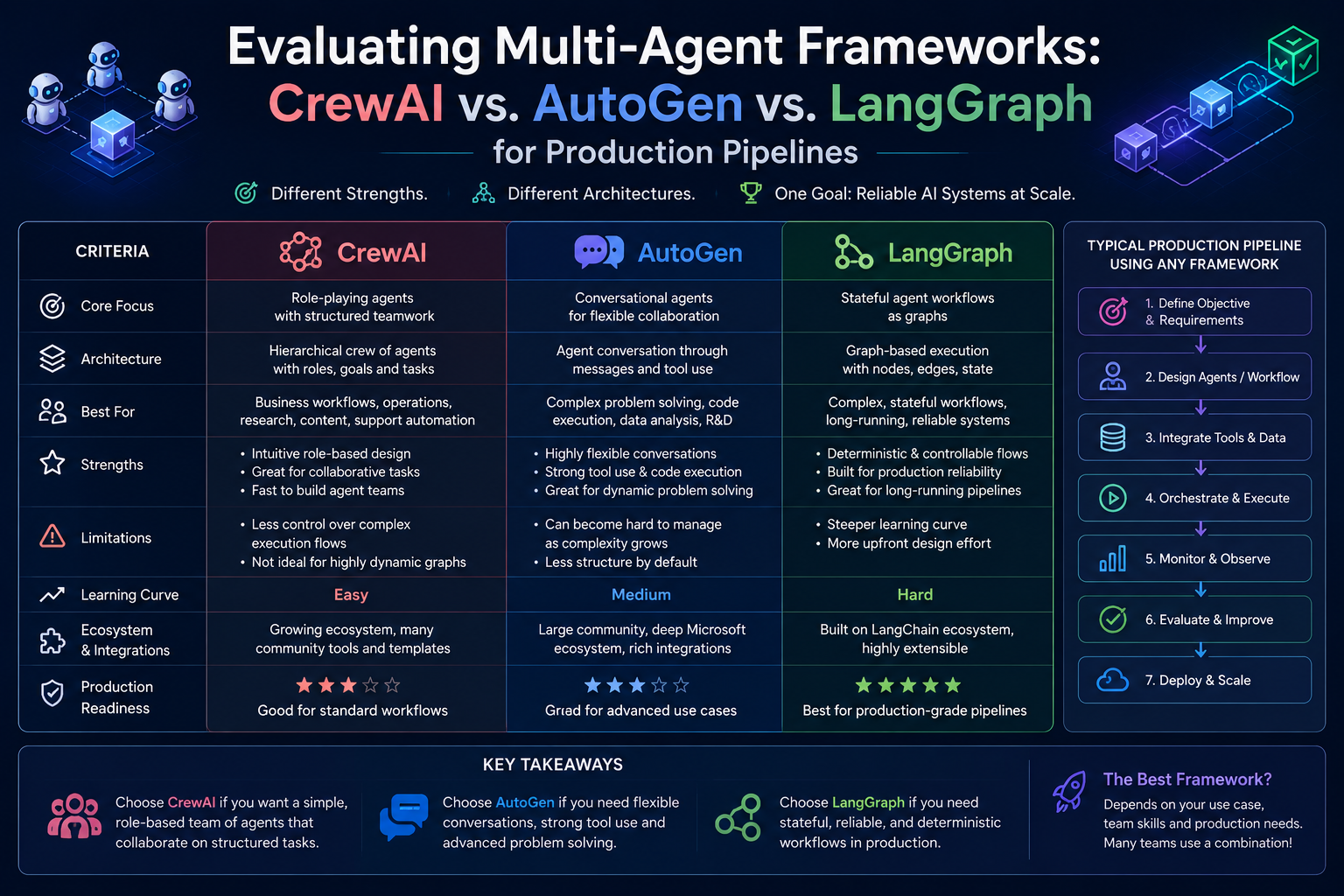
Multi-agent frameworks are moving from experiments into production pipelines. That shift makes framework choice more important. A demo can succeed with a few agents passing messages. A production pipeline needs state, retries, tool permissions, logging, evaluation, human review, deployment controls, and clear ownership.
This article compares CrewAI, Microsoft AutoGen, and LangGraph from a practical production perspective. The goal is not to crown one universal winner. The useful question is simpler: which framework fits your workflow, engineering team, and risk level?
Quick Take
- CrewAI is strongest when teams want role-based agents, business-friendly crews, structured flows, and faster movement from workflow idea to automation.
- AutoGen is strongest when teams need flexible agent conversations, event-driven patterns, custom collaboration logic, and research-friendly experimentation.
- LangGraph is strongest when teams need explicit state, durable execution, human-in-the-loop controls, deterministic steps, and production-grade orchestration.
- For production pipelines, the best framework is the one that makes failure handling, observability, evaluation, and governance easiest for your team.
- European SMEs should start with one narrow workflow and compare frameworks using real tasks, not only tutorial examples.
The production question is not "Which agent framework is most powerful?" It is "Which framework lets us control, test, and operate the agent workflow safely?"
What Are Multi-Agent Frameworks?
A multi-agent framework helps developers build AI systems where multiple agents work together. Each agent can have a role, tool access, memory, instructions, and a specific responsibility. One agent might research. Another might write. Another might check quality. Another might call an internal tool or ask a human for approval.
That sounds simple, but production pipelines quickly become complex. Agents may need to share state, pass structured outputs, retry failed steps, follow policy rules, and stop before risky actions. They may also need to explain what happened after the workflow finishes.
For business teams, this matters because agentic AI is useful only when it can be trusted inside real workflows such as:
- Customer support triage
- Sales research and proposal drafting
- Compliance document review
- Software bug investigation and pull-request support
- Procurement comparison and supplier analysis
- Internal knowledge search across documents and systems
Why Production Pipelines Are Different
In a prototype, a developer usually cares whether the agents can complete a task once. In production, the team must care whether the workflow can complete the task repeatedly, with predictable behavior, measurable quality, and acceptable risk.
A production multi-agent pipeline needs more than agent prompts. It needs an operating model.
This is where CrewAI, AutoGen, and LangGraph differ most. They can all support multi-agent systems, but they guide teams toward different design styles.
Framework Snapshot
CrewAI
Core idea: Build collaborative agents, crews, and flows for structured automation.
Best fit: Business workflows with clear roles, repeatable steps, and a need for practical automation.
AutoGen
Core idea: Build AI agents that cooperate through conversations, teams, event-driven messages, and custom patterns.
Best fit: Research, experimentation, custom multi-agent collaboration, and flexible agent communication models.
LangGraph
Core idea: Build long-running, stateful agents using explicit graph orchestration.
Best fit: Production pipelines that need durable execution, persistence, human review, and precise control.
Production Lens
Core idea: Agent success depends on control surfaces, not only model intelligence.
Best fit: Teams that evaluate workflows by state, failure recovery, observability, cost, and governance.
CrewAI: Best for Role-Based Business Workflows
CrewAI is designed around agents, crews, and flows. An agent performs a role. A crew groups agents around a goal. A flow coordinates steps, state, branching, persistence, and execution control.
That structure makes CrewAI easy to explain to non-specialists. A business leader can understand a "researcher agent", "analyst agent", and "reviewer agent" more easily than a low-level event graph. This is useful when AI adoption must involve business owners, compliance teams, and operations teams.
CrewAI is especially attractive when the workflow has clear roles:
- Research agent gathers information.
- Analysis agent structures the findings.
- Writing agent drafts the output.
- Review agent checks quality and policy fit.
- Human owner approves the final result.
For production, CrewAI's flow-first approach is important. Flows make it easier to manage state, define control paths, add conditionals, trace execution, and persist workflow progress.
Main strength: approachable workflow design for agent teams and business automation.
Main limitation: teams still need strong engineering discipline around testing, permissions, deployment, and failure handling when workflows become mission-critical.
AutoGen: Best for Flexible Agent Conversations
Microsoft AutoGen is an open-source framework for building AI agents and enabling cooperation among multiple agents. Its newer architecture emphasizes asynchronous, event-driven communication, observability, extensibility, distributed agent networks, and support for Python and .NET.
AutoGen is useful when the agent collaboration pattern itself is still being explored. Instead of forcing every workflow into a fixed shape, it supports patterns such as teams, group chat, selector-based coordination, swarms, graph workflows, memory, logging, and custom agents.
This makes AutoGen a strong fit for:
- Research teams testing new multi-agent patterns.
- Developer teams building custom collaboration logic.
- Scenarios where agents need to negotiate, debate, review, or hand off work dynamically.
- Organizations that want to experiment with event-driven agent networks.
- Teams with Microsoft ecosystem skills, especially where Python and .NET both matter.
AutoGen can be powerful, but that flexibility means production teams must be careful about architecture. Message flows, termination rules, memory, state, logging, tool permissions, and human approval must be designed deliberately.
Main strength: flexible multi-agent communication and event-driven system design.
Main limitation: high flexibility can become hard to govern if the team does not define boundaries, state, evaluation, and stopping conditions clearly.
LangGraph: Best for Stateful Production Orchestration
LangGraph is a low-level orchestration framework and runtime for building, managing, and deploying long-running, stateful agents. Its key production advantage is explicit control. Teams can combine deterministic software steps with LLM-driven agentic steps in the same graph.
That matters because production AI should not be fully probabilistic from beginning to end. Some steps should be controlled by ordinary software logic. Examples include permission checks, schema validation, risk classification, queue routing, approval gates, and final publishing rules.
LangGraph is a strong fit when the workflow needs:
- Durable execution for long-running tasks.
- Persistence and resumability after failure or pause.
- Human-in-the-loop checkpoints.
- Clear graph structure for branches, loops, and state transitions.
- Observability and evaluation through LangSmith or similar tooling.
- Precise control over where the model is allowed to act.
LangGraph is lower-level than many agent frameworks. That can mean a steeper learning curve. But for production pipelines where auditability and control matter, the explicit graph model can be a serious advantage.
Main strength: durable, stateful, auditable orchestration for complex agent workflows.
Main limitation: teams need stronger engineering skills and more upfront design work than with higher-level frameworks.
CrewAI vs. AutoGen vs. LangGraph
The table below compares the frameworks by production criteria, not by popularity or hype.
| Criteria | CrewAI | AutoGen | LangGraph |
|---|---|---|---|
| Core Model | Agents, tasks, crews, and flows. | Agents, teams, event-driven messages, and conversation patterns. | Explicit graph orchestration for stateful agents. |
| Best Use | Business automation with clear roles and repeatable workflow steps. | Flexible multi-agent collaboration, research, prototypes, and custom patterns. | Production pipelines needing durable state, control, and resumability. |
| Control Level | Medium to high when flows are used well. | Medium to high, depending on how the team designs message routing. | High, because workflow paths and state transitions are explicit. |
| State Handling | Strong with flows, state schemas, and persistence. | Available through state management patterns, but architecture choice matters. | Core strength through graph state, persistence, and durable execution. |
| Human Review | Good fit through task guardrails, flow steps, and HITL workflow design. | Supported through human-in-the-loop agents and intervention patterns. | Strong fit through interrupts, checkpoints, and state inspection. |
| Observability | CrewAI tracing and multiple observability integrations. | Logging, tracing, debugging, and OpenTelemetry-oriented observability. | Often paired with LangSmith for tracing, evaluation, and deployment monitoring. |
| Learning Curve | Moderate and business-readable. | Moderate to high for advanced event-driven designs. | Higher, especially for teams new to graph-based orchestration. |
| Main Risk | Overusing agents where simpler automation would be enough. | Letting flexible conversations become hard to stop, test, or audit. | Adding too much engineering overhead for small or simple workflows. |
Which Framework Fits Which Pipeline?
For production decisions, map the framework to the workflow shape.
| Production Pipeline | Best Fit | Why |
|---|---|---|
| Sales research to proposal draft | CrewAI | Clear roles such as researcher, analyst, writer, and reviewer are easy to model. |
| Research lab testing new agent behaviors | AutoGen | Flexible agent conversations and event-driven coordination support experimentation. |
| Customer support workflow with approval gates | LangGraph or CrewAI | Use LangGraph when state and escalation are complex; use CrewAI for simpler role-based triage. |
| Compliance document review | LangGraph | Explicit state, human review, auditability, and deterministic validation are important. |
| Custom multi-agent debate or review loop | AutoGen | Conversation patterns, teams, and selector logic are central to the design. |
| Long-running enterprise process | LangGraph | Durable execution and persistence become critical when a workflow can pause or fail. |
Production Readiness Checklist
Before choosing any multi-agent framework, teams should test the workflow with production constraints. A framework can make orchestration easier, but it cannot replace product thinking, security design, or operational ownership.
- Define the workflow: write the exact business process, inputs, outputs, owners, and success metric.
- Choose the agent pattern: decide whether you need role-based crews, conversation-based collaboration, or graph-based orchestration.
- Design state explicitly: define what each step knows, stores, passes, and forgets.
- Limit tool permissions: give each agent only the tools and data needed for its role.
- Add stopping conditions: prevent endless loops, repeated retries, and uncontrolled tool calls.
- Use structured outputs: prefer typed schemas, JSON, or validated objects between steps.
- Create evaluation sets: test with real examples, edge cases, bad inputs, and policy-sensitive tasks.
- Add human checkpoints: require approval before external messages, code merges, payments, HR decisions, or legal outputs.
- Monitor production runs: track latency, cost, model version, tool calls, failures, escalations, and user feedback.
- Plan rollback: know how to pause the agent pipeline, revert changes, and route work back to humans.
Common Mistakes to Avoid
The biggest mistake is starting with agents before defining the workflow. Agents are not automatically better than a simpler automation, retrieval system, or single-model assistant.
Watch for these production risks:
- Too many agents: extra agents can increase cost, latency, and confusion.
- Unclear ownership: every pipeline needs a business owner and a technical owner.
- Weak evaluation: a few successful demos do not prove production readiness.
- Open-ended tools: agents should not get broad access to systems without permission controls.
- No audit trail: teams must know what happened, which model acted, and which data was used.
- No human fallback: production systems need escalation paths when confidence is low.
A good production pipeline uses agents where flexibility is valuable and ordinary software where predictability is required.
EU AI Act and Responsible AI Considerations
For European companies, the risk of a multi-agent system depends on the use case. A marketing draft assistant is different from an agent that influences hiring, credit, education, healthcare, safety, legal advice, or worker management.
This article is not legal advice, but production AI pipelines should include responsible AI controls from the beginning:
- Use-case classification: identify whether the workflow could fall into a higher-risk AI category.
- Human oversight: keep human approval where AI output affects people, finances, safety, or compliance.
- Transparency: tell users, employees, or customers when they are interacting with or relying on AI-generated content.
- Logging: record prompts, model versions, retrieved data, tool calls, intermediate decisions, and approvals where appropriate.
- Data governance: ensure agents only access data they are allowed to use.
- Vendor and framework documentation: retain documentation on model behavior, framework architecture, security controls, and known limitations.
As agents gain more autonomy, governance must move closer to the architecture. The safest design is usually one where important decisions are visible, reviewable, and reversible.
Best Fit Recommendation
Choose CrewAI if you want a practical way to build role-based agent workflows and explain them clearly to business users. It is a strong fit for sales operations, research-to-report flows, internal automation, and repeatable business processes.
Choose AutoGen if your team needs flexible agent conversations, custom collaboration patterns, event-driven experiments, or deeper research into how agents should cooperate. It is a strong fit for advanced prototyping and custom multi-agent architectures.
Choose LangGraph if your workflow needs explicit state, long-running execution, human checkpoints, deterministic control, resumability, and strong observability. It is often the better fit for serious production pipelines where auditability matters.
For most European SMEs, the best starting point is CrewAI for simple role-based automation or LangGraph for controlled production workflows. AutoGen is strongest when the collaboration pattern itself needs experimentation.
FAQ
What is the best multi-agent framework for production?
There is no universal best framework. CrewAI is strong for role-based business workflows, AutoGen is strong for flexible agent collaboration, and LangGraph is strong for stateful production orchestration.
Is LangGraph better than CrewAI?
LangGraph usually gives more explicit control over state and orchestration. CrewAI can be easier to start with when the workflow is naturally role-based and business-readable.
When should I use AutoGen?
Use AutoGen when you need flexible agent conversations, custom multi-agent patterns, event-driven communication, group chat style coordination, or research-oriented experimentation.
Do production AI agents need human review?
Yes, for important workflows. Human review is strongly recommended before customer-impacting messages, code deployment, compliance outputs, payments, employment decisions, legal decisions, or safety-related actions.
Should small businesses use multi-agent frameworks?
Small businesses should use multi-agent frameworks only when the workflow has multiple meaningful steps or roles. For simple tasks, a single assistant, automation script, or RAG system may be enough.