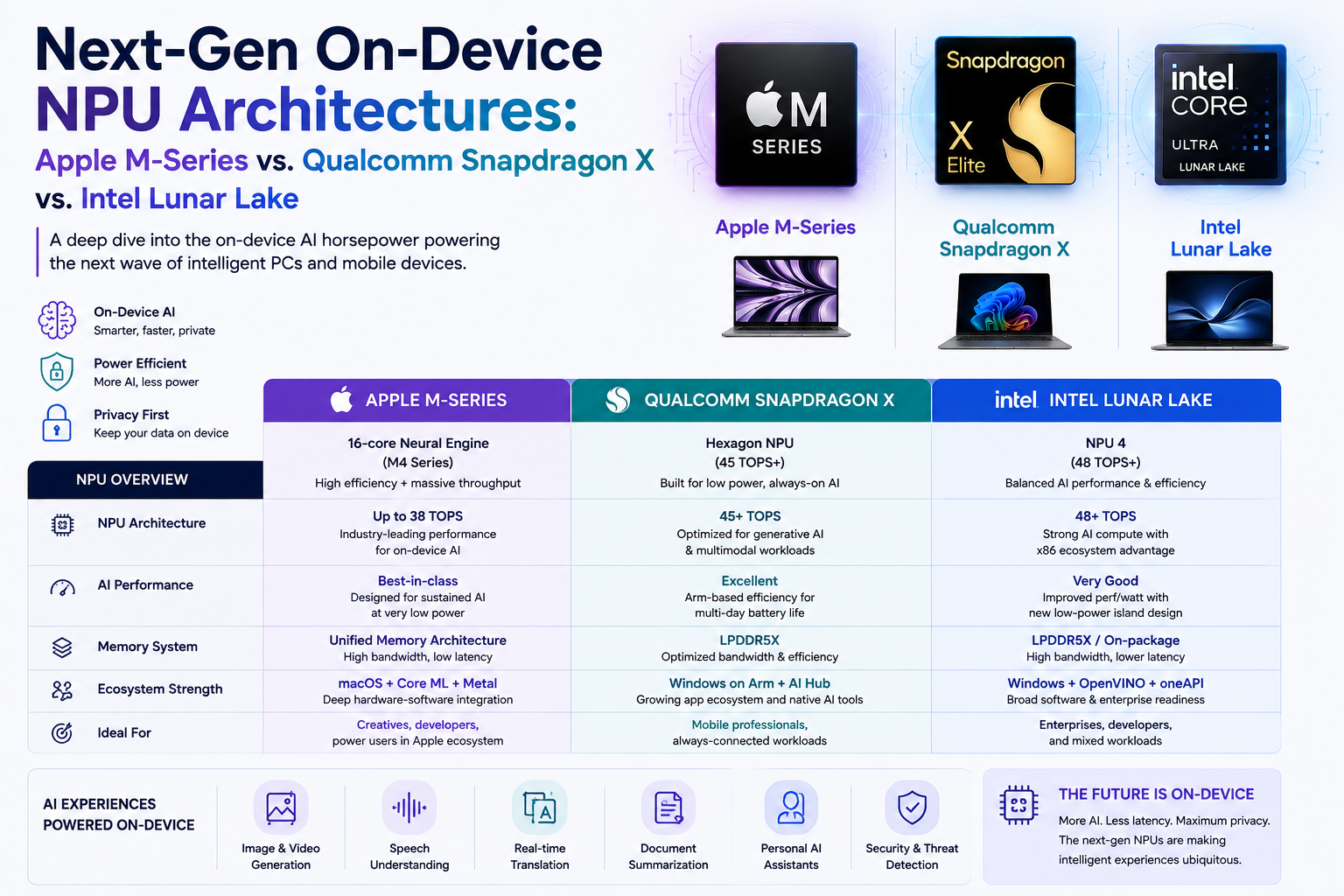
On-device AI is moving from a nice-to-have feature into a core PC architecture decision. The question is no longer only "which laptop is faster?" It is also "which device can run AI privately, efficiently, repeatedly, and close to the user's data without sending every request to the cloud?"
Apple, Qualcomm, and Intel are answering that question in different ways. Apple is scaling its M-Series around unified memory, Neural Engine acceleration, GPU neural accelerators, and tight software integration. Qualcomm is pushing Snapdragon X as an Arm-based Windows AI PC platform with high NPU throughput and long battery life. Intel's Lunar Lake, sold as Core Ultra 200V series processors, brings a stronger NPU into the x86 PC ecosystem while preserving broad Windows compatibility.
Quick Take
- NPUs are specialized processors designed to run neural network inference more efficiently than a CPU or GPU for many local AI tasks.
- Apple's M-Series strategy is strongest when the AI workload benefits from unified memory, macOS integration, Core ML, Metal, and local privacy controls.
- Qualcomm's Snapdragon X family has moved from 45 TOPS class NPUs in first-generation Snapdragon X parts to 80-85 TOPS class NPU options in Snapdragon X2 Elite and X2 Plus.
- Intel Lunar Lake, through Core Ultra 200V, focuses on x86 compatibility, Windows AI support, broad OEM adoption, and platform-level AI compute across CPU, GPU, and NPU.
- For enterprises, the best chip is not always the one with the biggest TOPS number. Software support, model size, memory bandwidth, battery behavior, security, procurement scale, and governance matter just as much.
The next AI PC battle is not only about raw NPU TOPS. It is about the full local AI stack: silicon, memory, runtime, operating system, developer tools, data control, and enterprise manageability.
What Is an NPU?
A neural processing unit, or NPU, is a dedicated hardware block built to accelerate AI inference. In simple terms, it is designed for the matrix and tensor operations used by neural networks, especially when models have been optimized or quantized for efficient local execution.
In an AI PC or Mac, the NPU does not replace the CPU or GPU. It works alongside them. The CPU still handles general logic and system work. The GPU often handles graphics, media, and larger parallel workloads. The NPU is designed for sustained, low-power AI tasks such as transcription, image effects, background removal, semantic search, local assistants, small language models, camera features, and privacy-preserving automation.
Why On-Device AI Matters
Cloud AI will remain important for large models, advanced reasoning, enterprise knowledge systems, and heavy multimodal workflows. But on-device AI is growing because many everyday tasks do not need a giant model in a data center. They need fast, private, low-latency assistance close to the user's files, camera, microphone, keyboard, and application context.
For European SMEs, the practical value is clear. Local AI can reduce cloud dependency, improve responsiveness, support offline or low-connectivity workflows, and limit the amount of sensitive data sent outside the device. It can also reduce cost when repeated inference runs locally instead of through paid cloud API calls.
Still, on-device AI is not automatically safer or compliant. If a local model reads sensitive files, records meetings, summarizes customer data, or automates decisions, the organization still needs policy, logging, access control, and human oversight.
Architecture Comparison
The three platforms are built around different assumptions. Apple controls more of the stack from chip to operating system to developer framework. Qualcomm is competing through Arm efficiency, high NPU throughput, connectivity, and Windows-on-Arm momentum. Intel is leaning on the scale and compatibility of the x86 Windows ecosystem.
| Platform | Current NPU Direction | Best Fit |
|---|---|---|
| Apple M-Series | Neural Engine plus GPU Neural Accelerators, unified memory, Core ML, Metal, Apple Intelligence, and tight macOS integration. | Creative workflows, local LLMs on Mac, developer tools, privacy-sensitive productivity, and teams already standardized on Apple devices. |
| Qualcomm Snapdragon X | Hexagon NPU focused on high local AI throughput, Arm efficiency, battery life, Windows AI features, and always-connected PC design. | Mobile knowledge workers, Copilot+ PCs, thin-and-light Windows devices, long battery use, and AI features that run well through Windows ML. |
| Intel Lunar Lake | Core Ultra 200V combines a stronger NPU with CPU, Arc GPU, x86 compatibility, Windows support, OEM scale, and broad application coverage. | Enterprises that need Windows compatibility, existing x86 software, mixed legacy workloads, vPro-style fleet planning, and wide OEM choice. |
Specs Snapshot
TOPS, or trillions of operations per second, is useful but incomplete. Vendors may quote different precisions, workloads, and platform-level combinations. Treat it as one signal, not the final buying decision.
| Chip Family | Official AI Hardware Claim | What It Really Means |
|---|---|---|
| Apple M4 | Apple stated that M4 includes a 16-core Neural Engine capable of up to 38 trillion operations per second. | A strong mobile-class Neural Engine supported by CPU ML accelerators, GPU compute, and Apple unified memory. |
| Apple M6 / M5 Ultra | Apple describes M6 with a Dual 16-core Neural Engine and M5 Ultra with a 32-core Neural Engine, high-bandwidth unified memory, and GPU Neural Accelerators. | Apple's direction is not only a bigger NPU. It is a larger local AI memory and compute system for local models and pro workflows. |
| Qualcomm Snapdragon X | First-generation Snapdragon X and X Elite parts list up to 45 TOPS NPU capability, while Snapdragon X2 Elite variants list 80-85 TOPS NPU options. | Qualcomm is making the NPU a central selling point for Windows AI PCs, especially thin-and-light and mobile-first devices. |
| Intel Lunar Lake / Core Ultra 200V | Intel states Core Ultra 200V can deliver up to 120 platform TOPS across CPU, GPU, and NPU, with a fourth-generation NPU designed for sustained efficient AI workloads. | Intel's advantage is platform coverage: NPU plus Arc GPU plus CPU in a familiar x86 Windows environment. |
| Copilot+ PC Baseline | Microsoft describes Copilot+ PCs as Windows 11 hardware with a high-performance NPU capable of more than 40 TOPS. | This created a practical market threshold for Windows AI PCs and pushed chipmakers to make NPUs visible to buyers. |
Apple M-Series: Unified Memory as the AI Advantage
Apple's on-device AI architecture is less about selling the NPU as a separate component and more about how the whole system behaves. The M-Series combines CPU, GPU, Neural Engine, media engines, memory, and Apple software frameworks into one tightly controlled environment.
This matters for local AI because many useful workloads are limited not only by compute but by memory. Running a local model needs enough memory capacity and bandwidth to move weights, activations, prompts, and generated output efficiently. Apple's unified memory architecture helps because CPU, GPU, and Neural Engine can work from a shared memory pool instead of copying data across separate memory systems.
Strength
Best angle: Tight integration across silicon, macOS, Core ML, Metal, Xcode, Apple Intelligence, and local privacy-first workflows.
Limitation
Main watchout: Less hardware choice and less cross-platform flexibility than Windows AI PC ecosystems.
Best Workloads
Examples: Creative AI, local coding assistants, media generation, document intelligence, developer tools, and local LLM experimentation.
Enterprise Fit
Where it fits: Teams already using Macs for software, design, media, data analysis, and privacy-sensitive knowledge work.
Qualcomm Snapdragon X: High-NPU Windows on Arm
Qualcomm's Snapdragon X strategy is direct: make the NPU one of the headline reasons to buy an AI PC. The first Snapdragon X generation helped establish the 45 TOPS class Windows AI PC conversation. Snapdragon X2 Elite pushes the family further, with official product tables showing 80-85 TOPS NPU options, LPDDR5x memory, high bandwidth configurations, and a mobile-first focus.
The Snapdragon X story is especially relevant for employees who live inside video calls, browsers, documents, email, productivity tools, and cloud apps. If the right workloads are optimized, the NPU can improve responsiveness and battery life while keeping many AI tasks local.
The main adoption question is software compatibility. Windows on Arm has improved, but enterprises still need to test older applications, drivers, VPN clients, device management tools, security agents, and specialist software before scaling procurement.
Snapdragon X is strongest when the organization wants mobile AI performance, long battery life, and modern Windows AI features more than old x86 certainty.
Intel Lunar Lake: The Compatibility-First AI PC
Intel's Lunar Lake architecture, delivered through Core Ultra 200V series processors, is designed to keep Intel central in the AI PC transition. The value proposition is not only the NPU. It is the combination of NPU, CPU, Arc GPU, power efficiency improvements, Windows support, broad OEM designs, and application compatibility.
For many enterprises, this matters. They may have years of Windows software, device management policies, endpoint security tooling, engineering applications, finance tools, and peripherals built around x86 PCs. Intel's AI PC route lets them add NPU capability without changing the entire software estate.
Intel also emphasizes platform-level AI compute across CPU, GPU, and NPU. That is useful because not every AI workload fits neatly inside an NPU. Some models run better on GPU, some need CPU preprocessing, and many production applications need runtime flexibility.
| Decision Factor | Apple M-Series | Snapdragon X | Intel Lunar Lake |
|---|---|---|---|
| Operating System Fit | Best for macOS-first organizations and Apple ecosystem users. | Best for Windows users ready to test Arm compatibility. | Best for Windows estates that need broad x86 compatibility. |
| NPU Positioning | Part of a tightly integrated local AI and unified memory stack. | A major headline feature, especially in Snapdragon X2 class parts. | A key AI PC component inside a wider CPU, GPU, and NPU platform. |
| Model Deployment | Core ML, Metal, Apple Foundation Models, and Apple developer tools. | Windows ML, ONNX Runtime, Qualcomm execution providers, and Qualcomm AI tooling. | Windows ML, ONNX Runtime, OpenVINO paths, and Intel software ecosystem. |
| Battery and Mobility | Strong efficiency, especially across MacBook and iPad-class devices. | Very strong mobile-first positioning with Arm efficiency and connectivity. | Improved x86 efficiency with strong OEM laptop coverage. |
| Enterprise Risk | Apple fleet management, procurement cost, and platform fit. | Windows-on-Arm app, driver, and security tool compatibility testing. | Generation differences, OEM implementation quality, and model optimization maturity. |
What Workloads Actually Benefit?
The most practical on-device AI use cases are not giant cloud-scale reasoning tasks. They are local, repeated, latency-sensitive, and privacy-sensitive tasks that run throughout the day.
| Use Case | Why NPU Helps | What To Validate |
|---|---|---|
| Meeting Transcription | Local speech models can reduce latency and limit audio sent to external services. | Accuracy, language support, consent, storage, retention, and speaker identification limits. |
| Document Search | Local embeddings and summarization can improve private knowledge retrieval. | Access control, document permissions, hallucination handling, and source citation quality. |
| Creative Editing | Image, video, and audio effects can run faster and with lower battery impact. | App support, media format compatibility, quality, and export performance. |
| Local Coding Assistance | Smaller coding models can help with autocomplete, refactoring suggestions, and private repository context. | Code quality, IP rules, secret handling, license checks, and human code review. |
| Security and Privacy Features | Local AI can classify sensitive files, detect suspicious media, or assist endpoint workflows. | False positives, explainability, logging, admin policy, and user transparency. |
Why TOPS Is Not Enough
A laptop with a higher NPU TOPS number is not automatically better for every AI workflow. Real performance depends on model format, quantization, memory bandwidth, driver maturity, runtime support, operator coverage, thermal behavior, and whether the application actually targets the NPU.
For example, a model may run beautifully on one platform if it has the right execution provider and quantized weights, but fall back to CPU or GPU on another. A feature may be marketed as "local AI" but still use the cloud for larger requests. A powerful NPU may sit underused if the enterprise applications are not optimized for it.
The right question is: "Can our actual workflow run locally, repeatedly, accurately, securely, and efficiently on this device?"
Procurement Checklist for European SMEs
- List real AI workflows: meeting notes, document search, code assistance, image editing, security classification, customer support, or local automation.
- Check software support: confirm whether the applications you use target the NPU or only use CPU/GPU/cloud execution.
- Test local model behavior: measure latency, battery impact, memory use, thermal behavior, and fallback behavior.
- Validate privacy assumptions: check whether data stays on device, when cloud escalation happens, and what telemetry is collected.
- Review compatibility: for Snapdragon X, test Windows-on-Arm dependencies; for Intel, check NPU optimization; for Apple, check macOS app availability.
- Match memory to model size: local AI often needs more memory than normal office use, especially for local LLMs and multimodal tools.
- Use pilot groups: test devices with developers, sales teams, finance users, designers, and support teams before buying at scale.
- Define support ownership: decide who owns drivers, model updates, endpoint policy, application deployment, and AI incident response.
- Keep records: document model versions, AI features enabled, data categories processed, user notices, and approved use cases.
- Avoid one-number buying: do not choose an AI PC only because of TOPS. Choose it because the end-to-end workflow performs well.
EU AI Act and Responsible AI Considerations
On-device AI can support privacy and data minimization, but it does not remove compliance responsibility. If a local AI feature affects employment, education, credit, healthcare, law enforcement, critical infrastructure, or other sensitive contexts, organizations should screen whether the use case may fall into a high-risk category under the EU AI Act.
For ordinary office productivity, many use cases may be lower risk, but the same responsible AI habits still matter: tell users when AI is involved, protect personal data, avoid hidden surveillance, document system purpose, keep human review for consequential decisions, and test cybersecurity and robustness.
| Responsible AI Area | What To Do | Evidence To Keep |
|---|---|---|
| Use-Case Screening | Classify AI workflows by purpose, affected users, data type, and decision impact. | AI inventory, intended purpose, risk notes, owner, and review date. |
| Transparency | Explain when local AI is used for summaries, recommendations, meeting notes, or automated suggestions. | User notice, feature description, limitation note, and change log. |
| Human Oversight | Require human approval for hiring, financial, legal, security, customer-impacting, or access-related decisions. | Approval workflow, role matrix, audit log, and escalation rules. |
| Data Governance | Control what local AI can read, summarize, store, index, or transmit to cloud services. | Data map, retention settings, access rules, telemetry review, and vendor documentation. |
| Cybersecurity | Patch AI runtimes, control model downloads, prevent prompt/data leakage, and manage plugins or agent permissions. | Security test results, update logs, incident procedure, and supplier risk review. |
On-device AI is not a compliance shortcut. It is a better technical option when paired with clear governance, security, and human accountability.
Best Fit Recommendation
Choose Apple M-Series if your organization is already Mac-heavy, values unified memory for local AI experiments, works in creative or developer workflows, and wants tight integration across hardware, operating system, and developer frameworks.
Choose Qualcomm Snapdragon X if mobility, battery life, Windows AI features, high NPU throughput, and thin-and-light productivity devices matter most, and your team is willing to validate Windows-on-Arm compatibility before broad deployment.
Choose Intel Lunar Lake if your company needs x86 Windows compatibility, broad OEM choice, existing enterprise software support, and a safer transition path into AI PCs without changing too much of the fleet model at once.
The smartest enterprise approach is a pilot, not a slogan. Buy a small set of representative devices, test your real apps and local AI workflows, measure what runs on the NPU, and choose based on evidence.
FAQ
What is an on-device NPU?
An on-device NPU is a dedicated processor inside a laptop, tablet, or phone that accelerates AI inference locally. It helps AI features run faster and more efficiently without always relying on the cloud.
Is a higher TOPS number always better?
No. TOPS is only one measure. Real-world AI performance also depends on model optimization, memory bandwidth, software runtime, driver maturity, thermal behavior, and whether the application actually uses the NPU.
Which is better for local AI: Apple M-Series, Snapdragon X, or Intel Lunar Lake?
Apple is strong for integrated macOS and unified memory workflows. Snapdragon X is strong for high-NPU Windows-on-Arm mobility. Intel Lunar Lake is strong for x86 Windows compatibility and broad enterprise adoption.
Does on-device AI improve privacy?
It can. Local processing can reduce the need to send data to cloud services, but organizations must still check telemetry, retention, access permissions, cloud fallback behavior, and user transparency.
How should SMEs evaluate AI PCs?
SMEs should test real workflows, not only specifications. The best evaluation includes application compatibility, local model speed, battery impact, privacy behavior, support model, and governance evidence.